Split a big site into zones, and hand each crew its packet
Sheet G-112 · from the in-app Guide · updated 2026-10-17
The short version
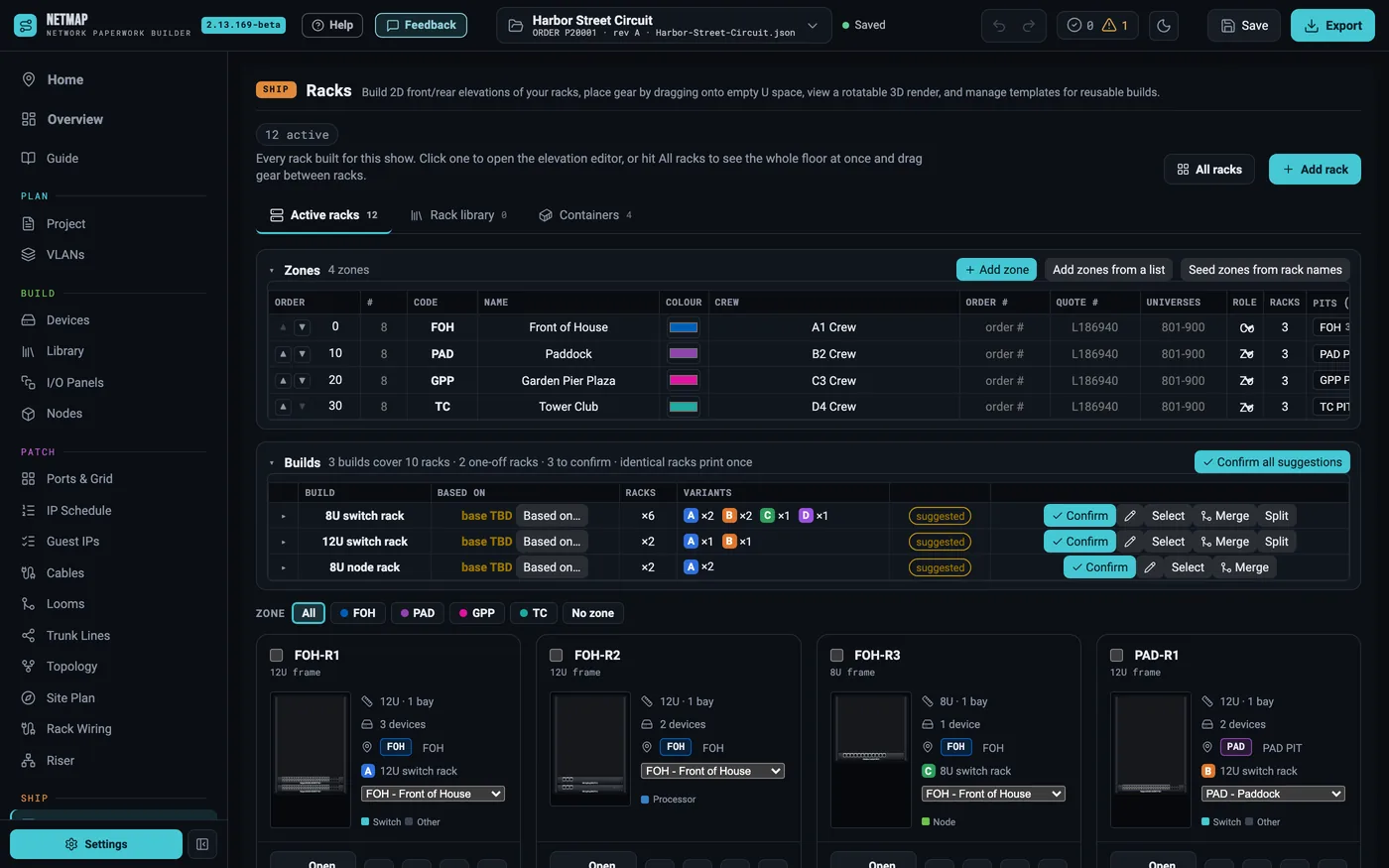
- Add zones on the Racks tab — one at a time, or paste a list of CODE, Name rows.
- A zone carries a number, colour, crew and order number; racks belong to a zone and everything in a rack follows it.
- A zone filter sits on Racks, Devices, Cables, Trunk Lines and the IP Schedule.
- Zone packets export one PDF per zone, with only that zone's racks, cables, trunks, ports and addresses.
01When a site is not one room
An arena is one room with one crew. A festival field or a street circuit is a dozen pits, each with its own crew chief, its own truck and its own paperwork. Zones are how netmap models that: every rack sits in a zone, every device and cable in the rack follows it, and the zone's colour carries through the site plan, the riser, the rack labels and the crew pages.
02Add the zones
On the Racks tab, + Add zone creates one; Add zones from a list takes pasted CODE, Name rows; Seed zones from rack names reads the codes you already put in your rack names (PAD-R1, GPP-R3). Each zone gets a number, a colour, a crew and an order number, and each can list its pits — the named locations inside it. A zone (and a sub-zone) can have its own universe block, so universes are planned per crew territory.
03Checks that know about zones
Validation understands the split: universe clashes between zones, a zone with no spare node, chain depth from each demarc, fiber ports running out at a pit. A cable or trunk that runs into another zone is flagged as crossing, so both crews know about it.
04A packet per crew
On the Paperwork tab, Zone packets renders one self-contained PDF per zone: a cover naming the zone, its crew and pits over a key plan of the real site, the drawing register, that zone's fiber plan, its rack wiring sheets, trunk lines, cable schedules, switch ports, the fiber pull list, the IP schedule and the zone's own checks. Tick the zones you need; each row shows its rack, device, cable and trunk counts before you export. A workbook can ride beside each PDF, and several packets download as one zip.
A cable that crosses into another zone prints in both packets, with its far end marked with the zone it goes to.
05And a crew page per zone
With Publish, zone links give every zone its own crew page — only its racks, cables and addresses — kept current as you edit, with QR cards to tape inside each rack.
Zones and zone packets are included on every tier — no add-on