Take guest sign-ups
Sheet G-108 · from the in-app Guide · updated 2026-10-17
The short version
- Reserve IP ranges, sACN universe chunks and dry lines on the Guest IPs tab — suggestions come from what is actually free in this show.
- Print the Guest IP & Universe Chart and hand it over, or publish and let the visiting LDs sign themselves up.
- ClearCom and ShowKontrol requests are separate: a guest can send one without claiming anything.
- Their name and artist show on the page; their phone and email come to you alone.
01Reserve what the guests get
A festival day means visiting LDs on your network, and the question is always the same: what can I have, and where do I plug in. The Guest IPs tab answers it once, in writing.
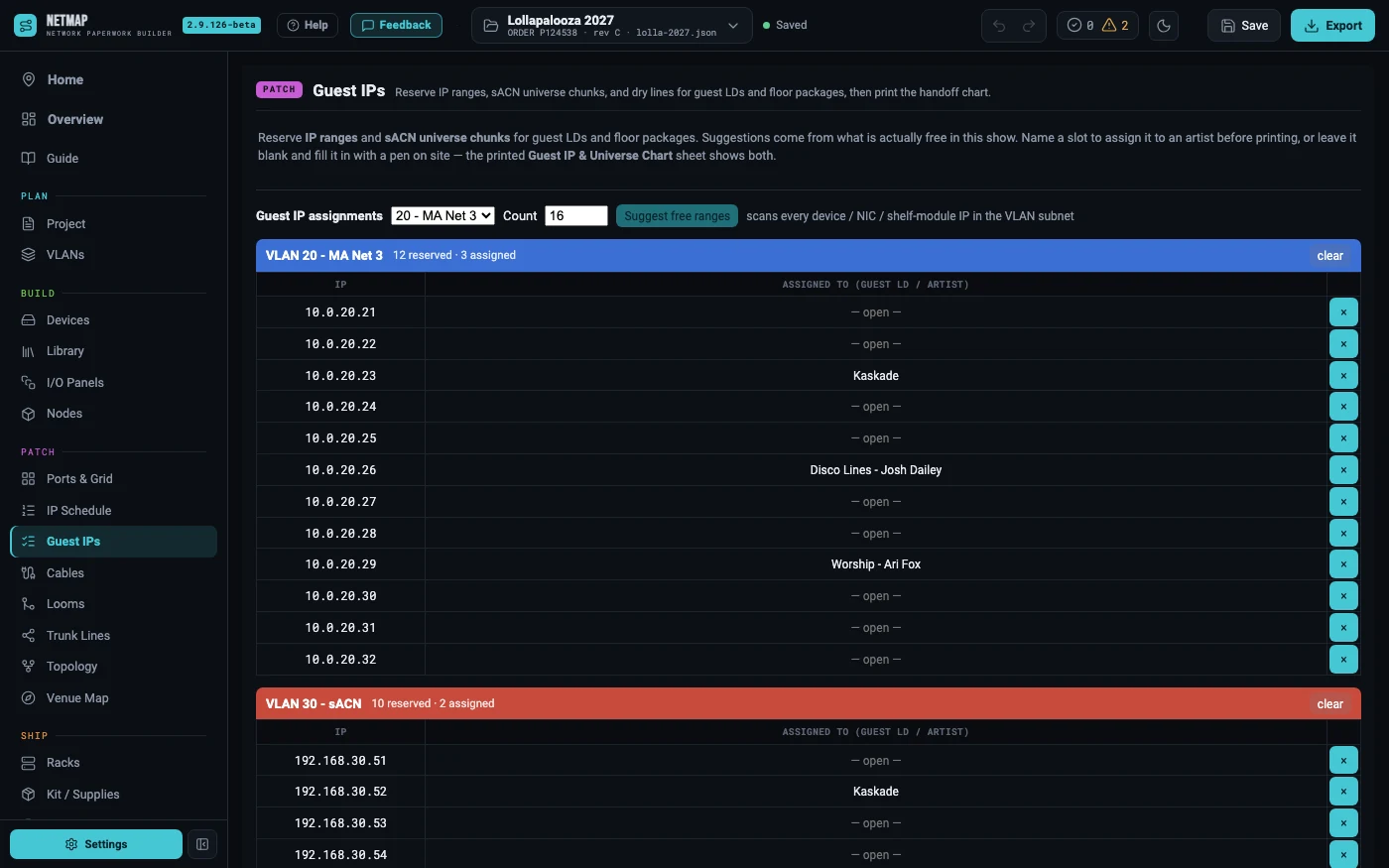
Pick a VLAN that has a subnet on the VLANs tab, say how many addresses you need, and hit Suggest free ranges. netmap scans every device, every console NIC and every shelf module already in the show and offers the first genuinely open runs — so a guest pool never lands on top of your own rig. Reserve turns a suggestion into rows.
Universes work the same way: set a chunk size, hit Suggest next free chunk, and it avoids every universe already spoken for by your nodes, PU outputs, RoboSpot rigs, the imported MVR patch, and the chunks you have already handed out.
02Dry lines are slots too
Not everything a guest needs is an address. A dry line is a physical point-to-point circuit you name yourself — "FOH to DJ riser", "USR on deck" — and it behaves like any other reservable slot. Type the location, set a quantity if you need several, and netmap auto-numbers them so each stays its own claimable line rather than collapsing into one ambiguous row.
There is nothing to suggest here, because there is no numeric range to scan: you know your own building. netmap's job is to keep them distinct, print them, and let a guest claim exactly one.
03Print it, or let them sign up
The Guest IP & Universe Chart prints with the drawing set: IP cells carry the VLAN colour, dry lines print by location, and any slot you left open prints blank with a tall row, so it can be filled in with a pen at the tech table. It lands in the Excel workbook too. That alone is a complete handoff, and it needs no internet.
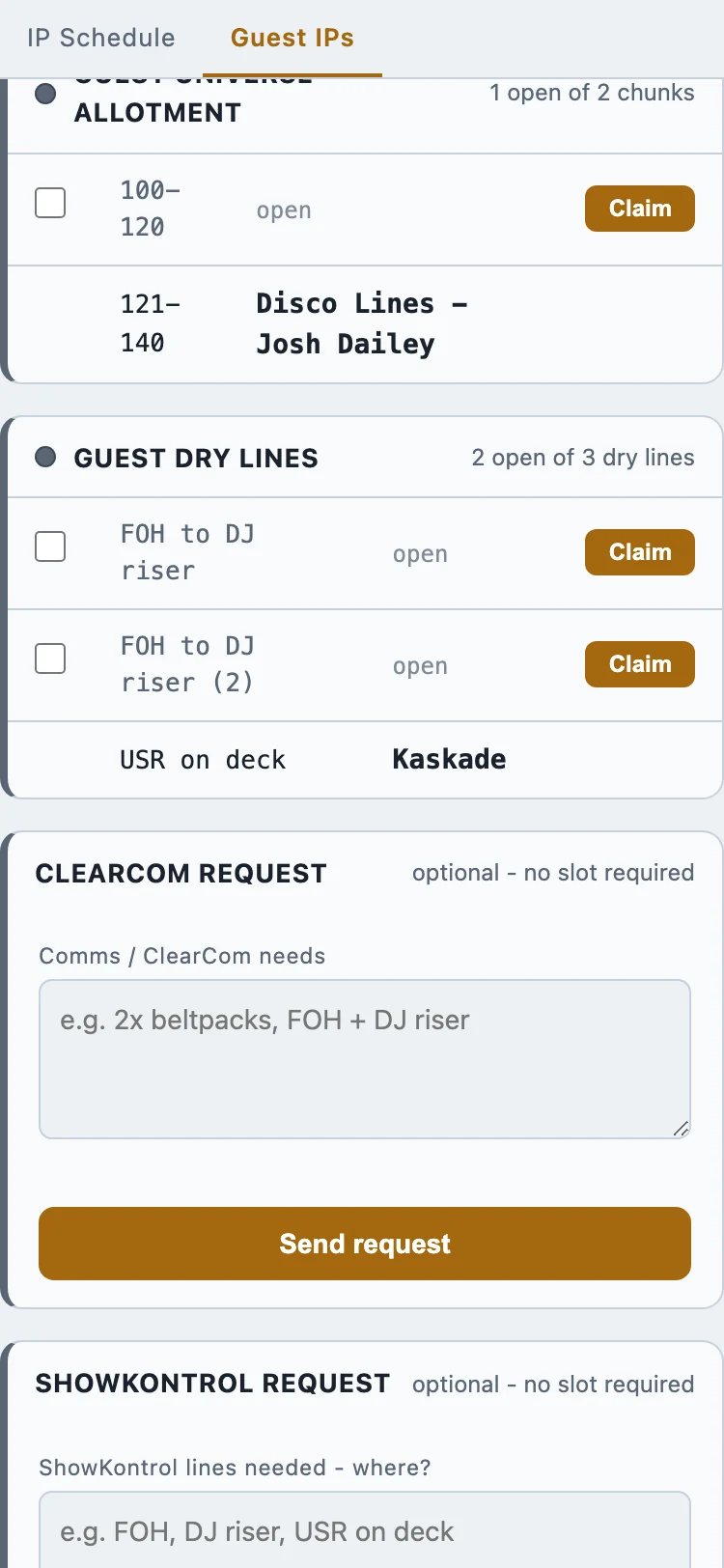
Or publish the show with Let viewers claim open guest slots ticked. A visiting LD opens the crew page on their phone, taps an open slot, and enters their name, artist, phone and email. The slot is held the moment they tap it, so two people cannot take the same address, and nobody signs up twice just in case.
04Confirming is not applying
Two different jobs, deliberately kept apart. Confirm is the promise back to the guest and the email that carries it. Apply is the step that writes their name and contact details onto your guest rows — the moment their sign-up becomes part of your paperwork.
Turn on auto-confirm and guests are told confirmed the instant they sign up, so you are never the bottleneck on a build day. Leave it off and they arrive pending for you to approve one at a time, or all at once. Either way the slot is already held.
You can also schedule one reminder for show morning. Every guest holding something gets their current numbers, sent by the publish service, with netmap closed and your laptop in a case. Set it past the link's own expiry and the panel tells you it will not fire.
05ClearCom and ShowKontrol, without a slot
The LD who needs two beltpacks at the DJ riser does not want an IP address, and until they can tell you that, they will find you in person during focus. Tick Collect ClearCom requests or Collect ShowKontrol requests when you publish and each one puts its own request card on the crew page.
A guest can send one without claiming any slot first — the cards work on a show where you reserved nothing at all, which is exactly the point. The form asks what they need first and only then asks who they are. Requests land in their own panel on your Guest IPs tab, separate from sign-ups on purpose, and you get an email the moment one arrives.
Both are per-show switches. A corporate load-in that needs neither simply never shows the cards.
06What is public and what is not
Worth being exact, because you are handling other people's contact details. On the published page, a claimed slot shows "artist — name" beside it, so the crew can see who has what. Their phone and email never render there: they come to you, and they land in your show file only when you hit Apply.
ClearCom and ShowKontrol requests are not shown on the page at all — not even back to the guest who sent one. They live in your panel and your inbox, and they are never written into the show file, so copy anything worth keeping before the link expires.
Guest sign-ups ride on publish, part of Studio · see the rate card · the chart itself prints on every tier